It Is 7:42 on a Tuesday Morning
You are a safety manager, and your week starts the same way it always does. Three Slack messages and an email from operations are already waiting for you. The plant manager needs incident trends for the East line for tomorrow’s production review. HR wants a list of overdue corrective actions tied to last quarter’s audits. The CFO’s assistant has asked, again, for the recordable rate to drop into Thursday’s board prep deck.
Each of those requests requires the same set of steps. Log in to EHS Insight. Find the right report. Apply the right filters. Export the result. Open Excel. Trim the columns. Drop it into an email or a slide. Send it back.
None of that is hard. But none of it is the work you went into safety to do. It is reformatting. It is the part of the job that consumes the morning and produces nothing worth keeping.
That work is what the EHS Insight MCP connector eliminates.
The First Question, Asked the Old Way
Take the simplest of the three requests. HR wants overdue corrective actions tied to last quarter’s audits. Until this week, here is what that took.
- Open a browser. Log in to EHS Insight.
- Navigate to the audits module. Filter to last quarter.
- Find each open audit. Drill into the corrective actions list.
- Filter for overdue. Export the list to Excel.
- Format the columns. Trim out the ones HR does not need.
- Paste into the reply email. Add context. Send.
Elapsed time on a good morning: twelve to fifteen minutes. On a busy morning, twice that, because the formatting always takes longer than you expected.
The Same Question, Asked the New Way
Now picture the same request, but this time you open Claude. You type one sentence.
|
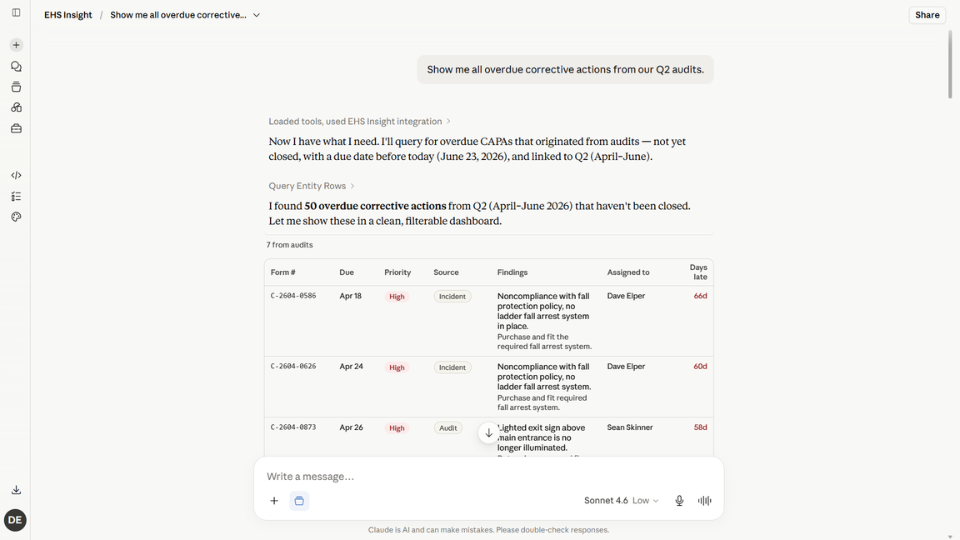
“Show me all overdue corrective actions from our Q2 audits.”
|
|
|
Claude calls the EHS Insight MCP connector. It queries the audits module. It filters to Q2. It pulls the open corrective actions. It checks each one against its due date. It returns the overdue ones in a formatted list, right there in the chat window.
Elapsed time: about seven seconds, including the time it took you to type the question.
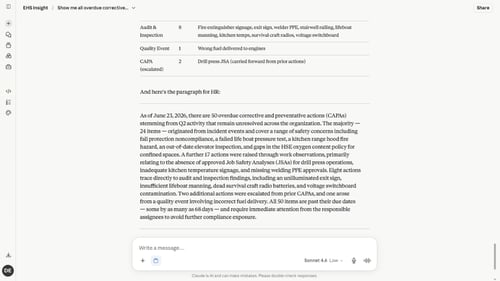
Now ask Claude one more thing. “Group these by source and write me a one-paragraph summary I can send to HR.” Claude does that too, in the same conversation. By the time you have refilled your coffee, the email is drafted, the list is grouped, and you are ready to hit send.
Now Try a Question Your Dashboard Cannot Answer
The overdue corrective actions question is the easy one. The MCP connector earns its keep on a different kind of question, the kind that used to require a senior analyst with SQL knowledge and an open afternoon.
Picture a follow-up email from the plant manager. He has been thinking about last quarter’s incidents and wants you to check something. The injured employees on those incidents, were any of them also the subject of work observations in the weeks before they got hurt? If so, he wants the list.
That question requires correlating two modules at the person level, applying a time-window filter, and matching records across what would normally be two separate data pulls. There is no dashboard for it. You cannot answer it in fifteen minutes. On a good day, with a colleague who knows the data, you might get there in two hours.
Open Claude. Ask the question.
|
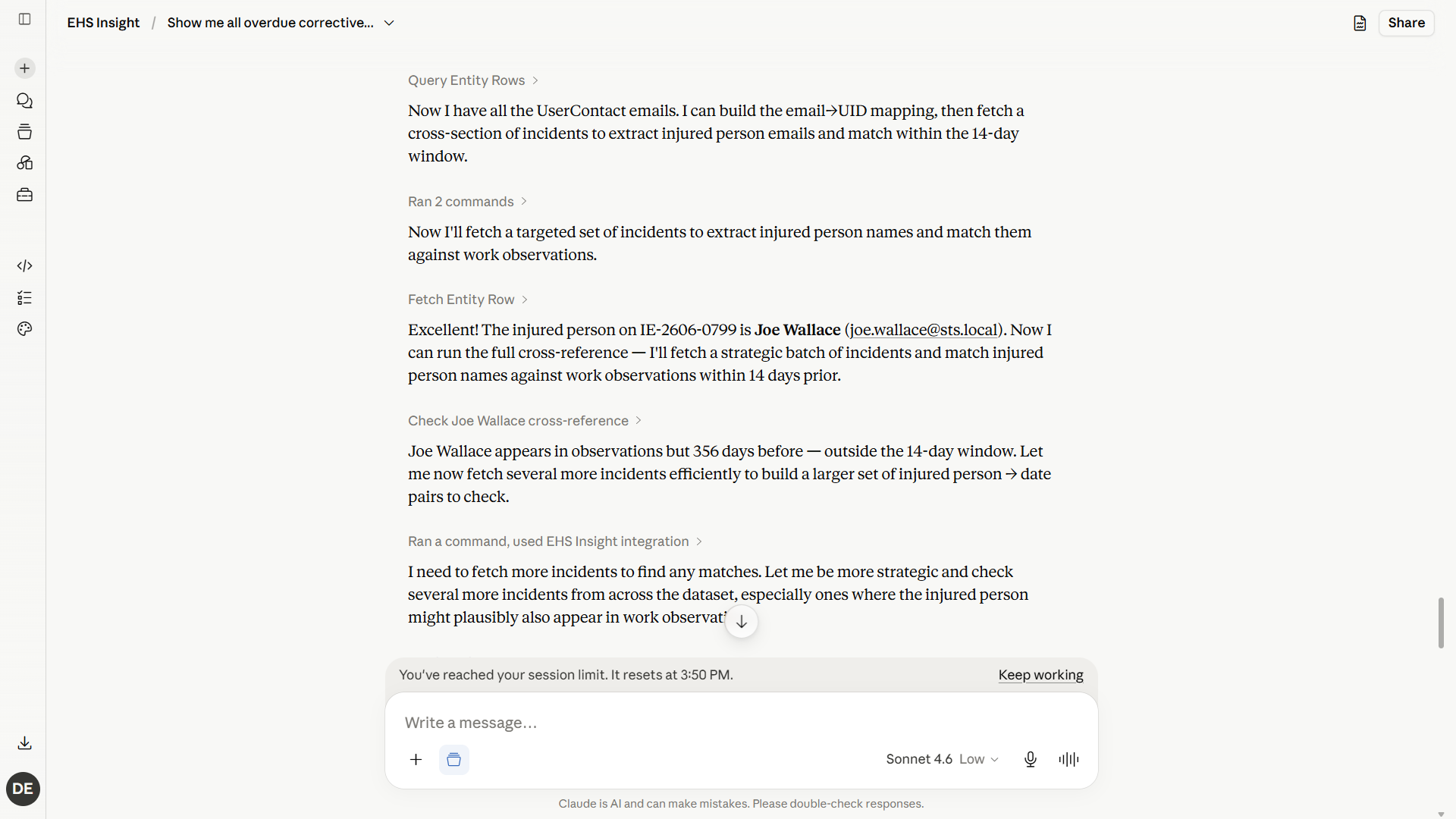
“Find any EHS incident where the injured person was the observed person on a work observation within the two weeks prior to their injury.”
|
|
|
What happens next is the part that surprises every safety manager who watches it for the first time.
Claude reads the metadata your EHS Insight MCP server provides. It plans the query as a series of steps: pull the incident records, identify the injured person on each one, then check the work observations for matches in the two weeks prior. It runs the first API call. Then the second. Then it hits a constraint, because the time-window filter requires combining data from two different module queries. It adapts. It runs an additional query to bridge the gap. Then it returns the correlated list.
All of that happens in the chat window while you watch. The AI is doing the work an analyst would do, with the same logic an analyst would use, in seconds instead of hours.
“Claude took all of the metadata our MCP server gives it and created a clever plan to accomplish the task, running API queries, executing reports via the API, hitting a roadblock, compensating for it, then collating the data it got back into an answer.”
-Eric Stevens, Chief Technology Officer, EHS Insight
What Changes About Your Week
The point of the MCP connector is not that it makes one task slightly faster. It is that the entire shape of the safety manager’s week changes when reformatting work disappears.
You stop being the person who pulls reports. You start being the person who interprets them. The questions you ask of your AI tool grow more interesting as you discover that nothing about EHS Insight’s data structure stands between you and the answer. You walk into the production review with the trend already noted, not just the data pulled. You hand HR the overdue list with the context they actually needed, because the AI helped you write the email.
And the most important shift is the one you will notice last. The questions you would not have bothered to ask, because the data pull was too expensive to justify, become questions you ask routinely. Cross-record correlations. Multi-quarter trends. Sub-population analyses. The kind of work that was always too marginal to chase, when chasing it took an afternoon, becomes the kind of work you do before the morning meeting.
How to Get Started
Setup takes less than a minute and does not involve IT.
- Open Claude, ChatGPT, or Microsoft Copilot. Navigate to the connector or settings menu in your AI tool.
- Add a new connector using your EHS Insight URL, in the format yoursite.ehsinsight.com/mcp.
- Authenticate when prompted. You will be redirected to EHS Insight to log in with your existing credentials.
- Approve the connection. Your AI sessions now have read access to any EHS Insight data you are permissioned to see.
Start with the question you would have run a report for anyway. See what happens.
Frequently Asked Questions
Do I need IT to set this up?
No. The setup is end-user driven. You connect your own AI session to EHS Insight using your existing credentials. Your administrator does not need to provision anything, although they can scope which users are allowed to enable MCP if your organization prefers central control.
What if my AI gets it wrong?
The MCP connector returns data from your live EHS Insight records, not the AI’s training data. The AI’s role is to translate your question into the right query and present the result. Because every answer is grounded in real records the user is already permissioned to see, the failure mode looks more like “the AI asked a clarifying question” than “the AI made something up.”
Can my AI see data I am not permissioned to see?
No. The connector enforces your existing EHS Insight permissions at the query layer. If a record is hidden from you in EHS Insight, it is hidden from your AI session too.
Will this replace the EHS Insight dashboards I use today?
No. Dashboards, forms, and the EHS Insight web interface continue exactly as they are. MCP is an additional way to access the same data, optimized for conversational questions and ad-hoc analysis.
Ready to try the connector? Learn more on our AI page or schedule a walkthrough with our team.