Driver Management Module

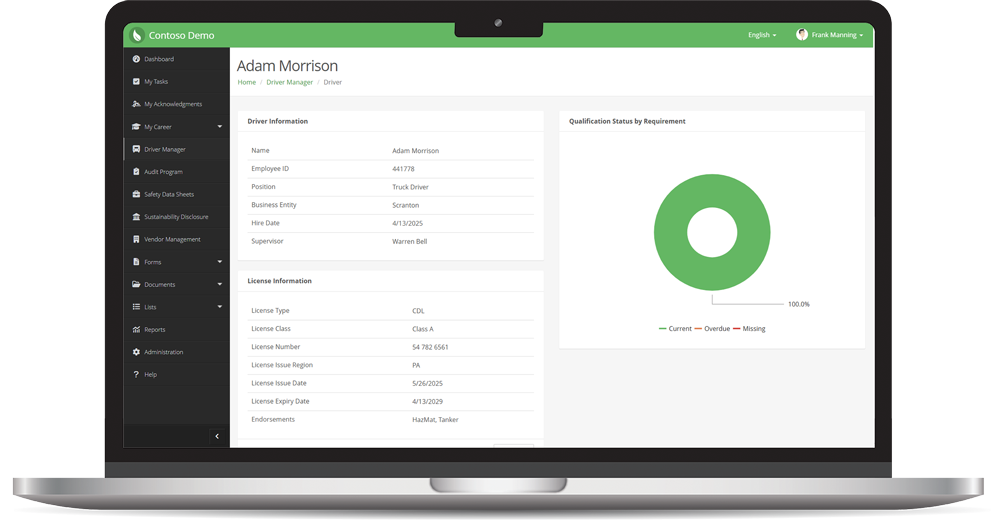
The EHS Insight Driver Management Module simplifies DOT compliance by bringing every driver's license, authorized vehicles, and qualification documents into one platform, eliminating the need for paper files and spreadsheets. It enables driver and fleet managers to see at a glance who is qualified and road-ready. 

Unlock Your Free Access Now
Read the Solution Brief
Driver-Record

Keep Every Driver Qualification File Complete & Current 

Save time and strengthen compliance with driver qualification software built for fleets. Requirements are assigned automatically based on each driver's license, vehicles, and groups, so every Driver Qualification file starts complete and stays that way.

The platform not only reduces administrative work but also helps keep unqualified drivers off the road, giving you a single, audit-ready source of truth for your entire driver roster.

Save Time

Skip the manual checklist. The right requirements are assigned the moment a driver is added, giving driver managers an instant list of documents to collect instead of hours spent cross-referencing regulations.

Achieve Compliance

Support DOT/FMCSA driver qualification requirements with organized, complete records. Track every requirement across Drug & Alcohol, Licensing, Medical, Qualification, and Training categories, and tailor the list to fit your organization.

Enhance Decision-Making

See your whole fleet at a glance. Sort drivers by qualification status and requirement completion, filter the Driver Document Expiration Log by category or status, and plan renewals 30, 60, or 90 days ahead.

Know Who's Road-Ready, Every Day

Licenses, medical certificates, motor vehicle records, drug and alcohol results, and training all come due on different dates. With EHS Insight, each driver's status updates automatically as documents are added or expire, so you always know who is Qualified, Not Qualified, or Disqualified.

Whether you're onboarding a new hire or preparing for a DOT audit, you'll have the records you need to stay compliant, organized, and always ready.

Improve Transparency

Give everyone the same view of driver readiness. Drivers are reminded of their own upcoming expirations, managers see status changes as they happen, and a dedicated Driver Manager role controls who can view and edit records.

Produce Records On Demand

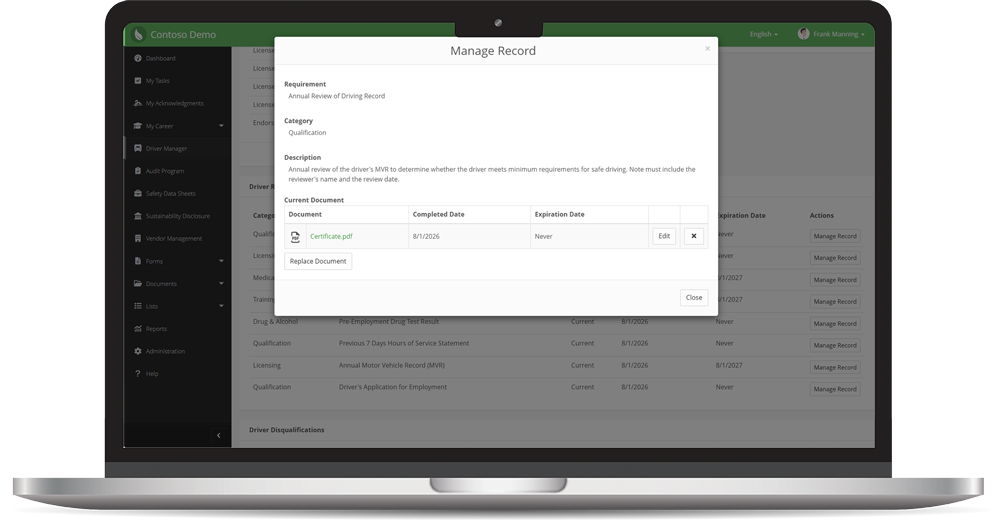
When an auditor asks for a driver's file, hand it over in seconds. The Driver Qualification Record pulls together status, upcoming expirations, and full history, and downloads every document in one zip file.

Add-Driver-Qualification-Status
Manage-Driver-Record

Key Features for Fleet Managers and Safety Pros

Automatic Requirement Assignment Requirements are matched to each driver based on license type, class, and endorsements, the vehicles they operate, and Driver Requirement Groups such as Hazmat Transport, Long Haul, or Local Delivery.

Real-Time Driver Qualification Status Every driver is shown as Qualified, Not Qualified, or Disqualified, with a requirement completion percentage that makes it easy to sort and spot who needs attention.

Automated Expiration Reminders Drivers receive email reminders up to three times before a document expires, then on a recurring schedule until it's renewed.

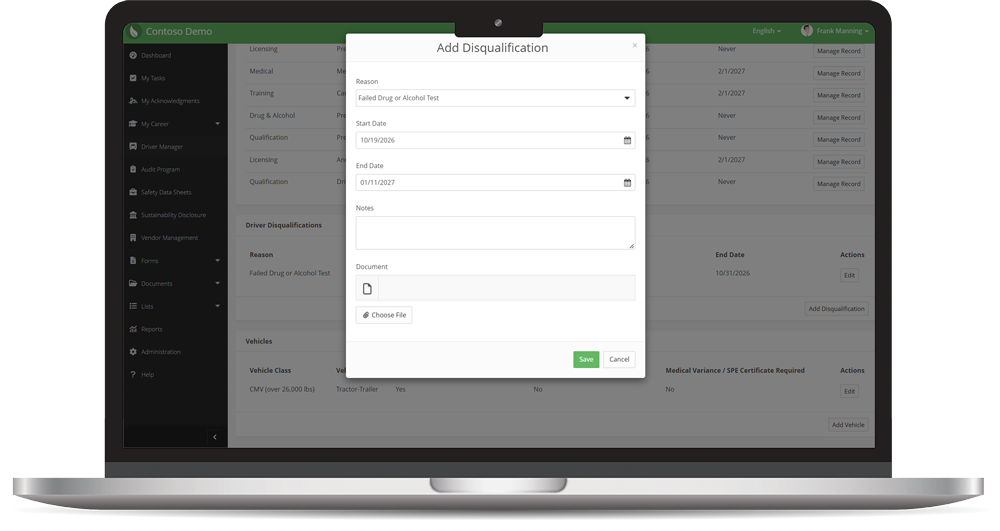
Disqualification Tracking Record license suspensions, failed drug or alcohol tests, medical holds, and more, with start and end dates that override requirement status while active.

Driver Reports and One-Click Records The Driver Document Expiration Log gives a fleet-wide view of document status and upcoming renewals. The Driver Qualification Record shows a driver's complete file and downloads every document as PDFs in one zip file.

The Benefits of EHS Insight's Driver Management Platform

EHS-Platform-Modules-EHS-Insight-4

Stay Audit Ready

Support DOT/FMCSA compliance by keeping every driver's qualification file complete and current. Upload each document with its completed and expiration dates, and produce a driver's full record whenever an auditor asks.

EHS-Platform-Modules-EHS-Insight-5

Reduce On-Road Risk

Expired, missing, and disqualified drivers are flagged automatically. Overdue documents change a driver's status the moment they expire, reducing the risk of putting an unqualified driver behind the wheel. 

EHS-Platform-Modules-EHS-Insight-1

Retire the Spreadsheets

Replace paper files, shared drives, and tracking sheets with one record per driver. Driver details stay in sync between the Driver Manager and Users & Contacts, so information is entered once and trusted everywhere.

EHS Insight Saves Time, Saves Money, and Improves Safety Cultures

What is Driver Management Software?

Driver management software is a system for tracking each driver's license, the vehicles they're authorized to operate, and the documents required to keep them qualified. EHS Insight Driver Management puts all of this in one place, assigns the right requirements automatically, and shows at a glance which drivers are qualified to drive.

What is a Driver Qualification File (DQ)?

A Driver Qualification file is the set of records an FMCSA-regulated motor carrier must keep for each commercial motor vehicle driver. Under 49 CFR 391.51, it includes the driver's employment application, motor vehicle records (MVRs), road test certificate or equivalent, annual review of driving record, and medical examiner's certificate. Driver Management tracks each of these documents and its dates for every driver.

Who is required to keep a Driver Qualification File?

Motor carriers must keep a DQ file for every driver who operates a commercial motor vehicle (CMV) in interstate commerce. A CMV includes a vehicle with a gross vehicle or combination weight rating of 10,001 pounds or more, a vehicle designed or used to carry more than 8 passengers for compensation or more than 15 without, or any vehicle carrying hazardous materials that require placards. Intrastate carriers should check their state's rules.

How long do Driver Qualification files need to be kept?

A DQ file must be kept for as long as the driver is employed, plus three years after employment ends. Some items, such as annual MVRs, annual review notes, and medical certificates, may be removed three years after they were completed. Driver Management keeps each driver's full record history, so past documents stay organized and easy to find.

How does EHS Insight decide which requirements apply to each driver?

Requirements are assigned automatically based on the driver's license type, class, and endorsements, the vehicles they're authorized to operate, and any Driver Requirement Groups they belong to. For example, a CDL driver operating a tanker in interstate commerce is automatically assigned requirements such as the Annual Review of Driving Record and the Previous 7 Days Hours of Service Statement.

What do Qualified, Not Qualified, and Disqualified mean?

A driver is Qualified when every assigned requirement is current and there is no active disqualification. A driver is Not Qualified when one or more requirements are overdue or missing. A driver is Disqualified when an active disqualification is on record, such as a suspended license, a failed drug or alcohol test, or a medical hold, regardless of requirement status.

What reports are included with Driver Management?

Driver Management includes two reports. The Driver Document Expiration Log is a fleet-wide list of driver requirements with status and expiration dates, filterable by driver, category, status, and date. The Driver Qualification Record shows one driver's complete qualification file, including overdue and missing items, expirations within 30, 60, and 90 days, and full record history.

Can I produce a driver's complete qualification file for a DOT audit?

Yes. The Driver Qualification Record pulls together a driver's status, current requirements, upcoming expirations, and record history. Its Download Driver Records option exports every document in the driver's file as PDFs in a single zip file, so you can hand an auditor a complete file in one click.

How does Driver Management help with medical certificate and MVR renewals?

Driver Management tracks the expiration date of every document and emails drivers before it expires, then on a recurring schedule until it's renewed. This matters for recurring items: medical examiner's certificates are valid for up to two years, and carriers must obtain and review each driver's MVR at least once every 12 months. When a document expires, the driver's status changes automatically.

How does EHS Insight decide which requirements apply to each driver?

Requirements are assigned automatically based on the driver's license type, class, and endorsements, the vehicles they're authorized to operate, and any Driver Requirement Groups they belong to. For example, a CDL driver operating a tanker in interstate commerce is automatically assigned requirements such as the Annual Review of Driving Record and the Previous 7 Days Hours of Service Statement.

Our Latest Stories

Empower your workforce with EHS Insight.

As you elevate your workplace safety culture, you can rely on us. Over 500,000 users trust EHS Insight for improved team collaboration, accountability, and safety visibility.

When you team with us, we support your journey.

Unlock Your Free Access Now