AI for EHS, QMS and ESG
AI for EHS That Works the Way You Do
Catch serious injury and fatality precursors earlier, fix data quality at the source and close corrective actions faster. EHS Insight builds three layers of intelligence into your EHS program, including a connector that brings your live EHS data into Claude, ChatGPT and Microsoft Copilot.
Ask in plain language. Get answers from your real data. No exports and no new tool to learn.
Want a tour first? Take the Instant Demo

Live, Permissioned EHS Data

Ask EHS Insight
Which sites are trending toward a recordable this quarter?
3 Layers
Task Assistant AI, Analytical AI and the MCP Connector, working together
Built In
AI capabilities built into forms, reports, permits, SDS, vendors and CAPAs
MCP
Live EHS data in Claude, ChatGPT and Microsoft Copilot
Read-Only
MCP sessions follow your role-based and row-level permissions
Built In, Not Bolted On
Intelligence Across Everything Your Team Already Does
EHS Insight is built to be intelligent from the ground up. AI works across the platform to surface hidden risk, sharpen reporting accuracy and help your team take the right action faster.
This is not basic automation, and it is not a single assistant attached to the side of the product. The platform detects SIF precursors, analyzes photos, improves reporting accuracy, verifies data quality, summarizes documents and recommends corrective actions in real time, inside the system your team uses every day.
By catching risk early, EHS Insight saves time, reduces cost and, above all, helps protect lives.
How It Is Built
We Built EHS AI in Three Layers, on Purpose
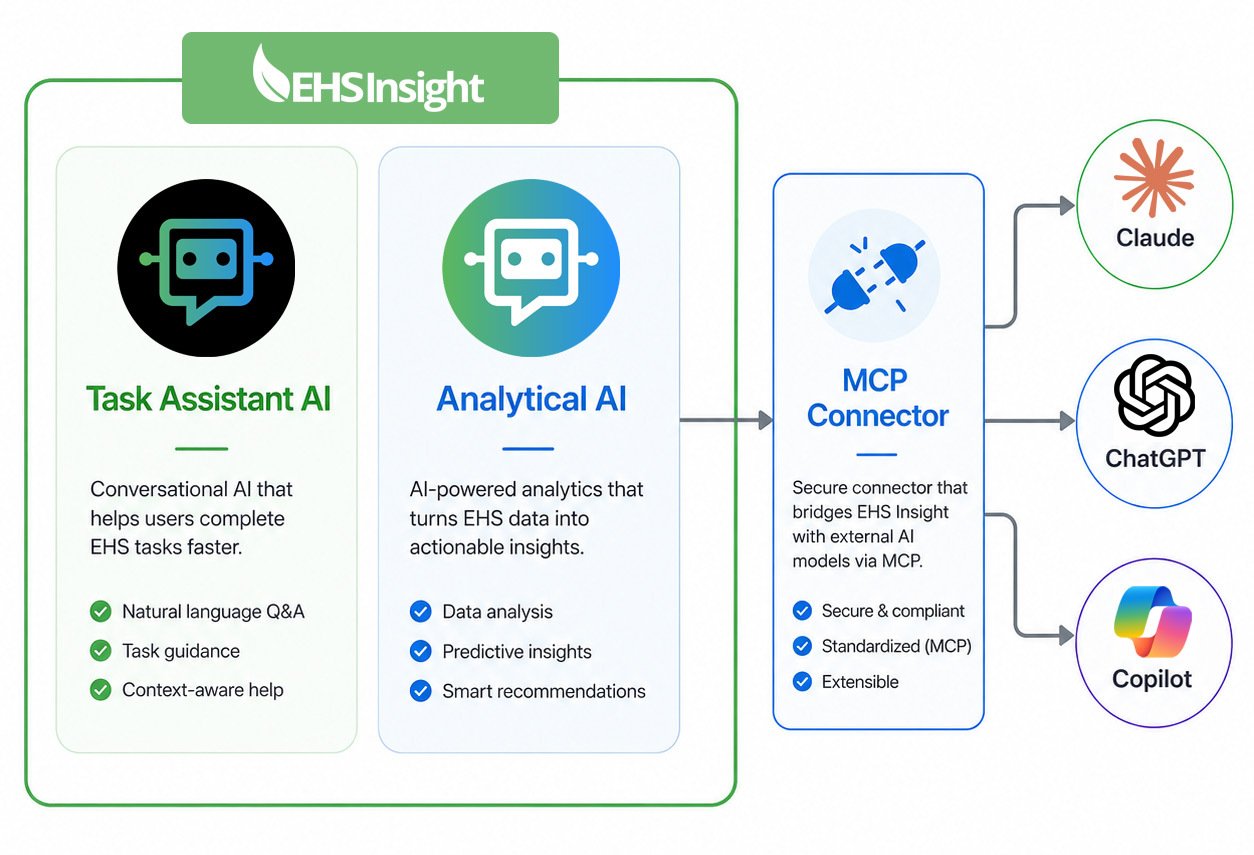
Many platforms add a chatbot to their product and call it AI. EHS Insight takes a different approach: two kinds of intelligence built directly into the platform, plus a connector that brings your data out to the AI tools your team already uses every day.
Layer 1
Task Assistant AI
Purpose-built models embedded in the workflows where you need them. They review incident descriptions for missing concepts, suggest corrective actions from photos attached to an investigation and break permits down into the underlying obligations and compliance tasks.
Where it works: Inside EHS Insight forms and workflows
Layer 2
Analytical AI
Capabilities inside EHS Insight that help you search your data, surface trends and generate reports without manually building every query. It helps you understand what your EHS program is telling you while you work.
Where it works: Inside EHS Insight reports, forms and documents
Layer 3
The MCP Connector
The Model Context Protocol connector exposes EHS Insight to Claude, ChatGPT and Microsoft Copilot. Ask questions in plain language and get answers from your live, permissioned EHS data in the same conversation where you draft emails, build decks and run your day.
Where it works: Inside the AI assistant your team already uses
Built-in platform AI features continue to be purpose-built and precise, focused primarily on getting high-quality data into the system. The MCP connector is what makes that high-quality data available out where information workers are already working.
Eric Stevens, Chief Technology Officer, EHS Insight
Built-In AI Capabilities
Intelligence Built Into Every Part of Your EHS Platform
Spot serious injury and fatality precursors before they become incidents, surface the patterns hidden in your inspection and observation data and turn routine reporting into early warning. Choose a capability to see how it works.
See Risk Earlier
Capture Better Data
Act Faster
See Risk Earlier
Spot the Warning Signs Before They Become Serious
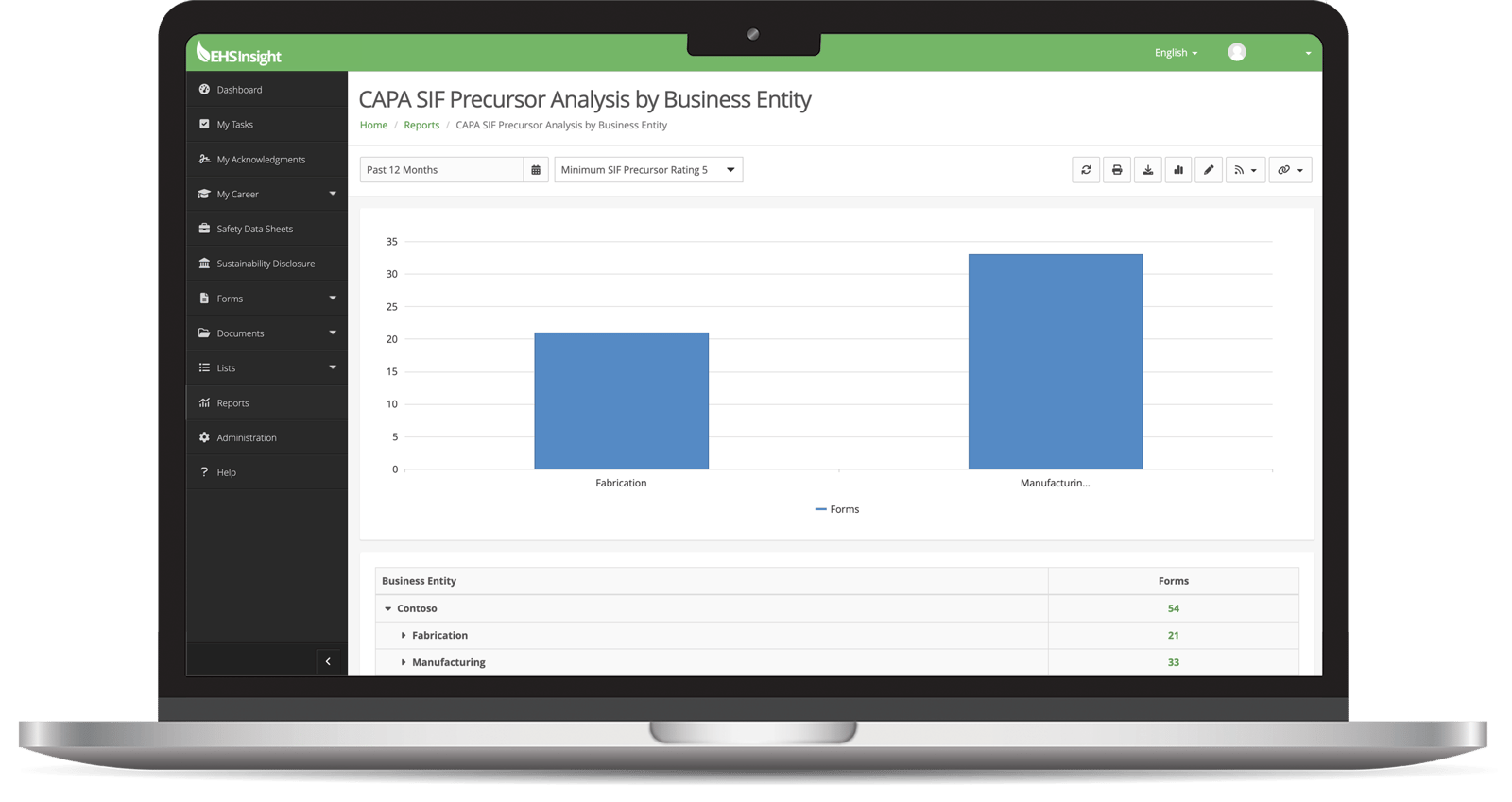
SIF precursor detection is a high-value application of AI in safety, and EHS Insight runs it automatically. The platform analyzes forms, audits, observations, incidents and CAPAs to identify indicators that traditionally go unnoticed, then highlights high-risk items so you can review them quickly.
What This Means for Your Organization
- Proactive intervention
- Better high-severity prevention
- Greater visibility into hidden risks
- Reduced likelihood of serious injury or fatality
See Risk Earlier
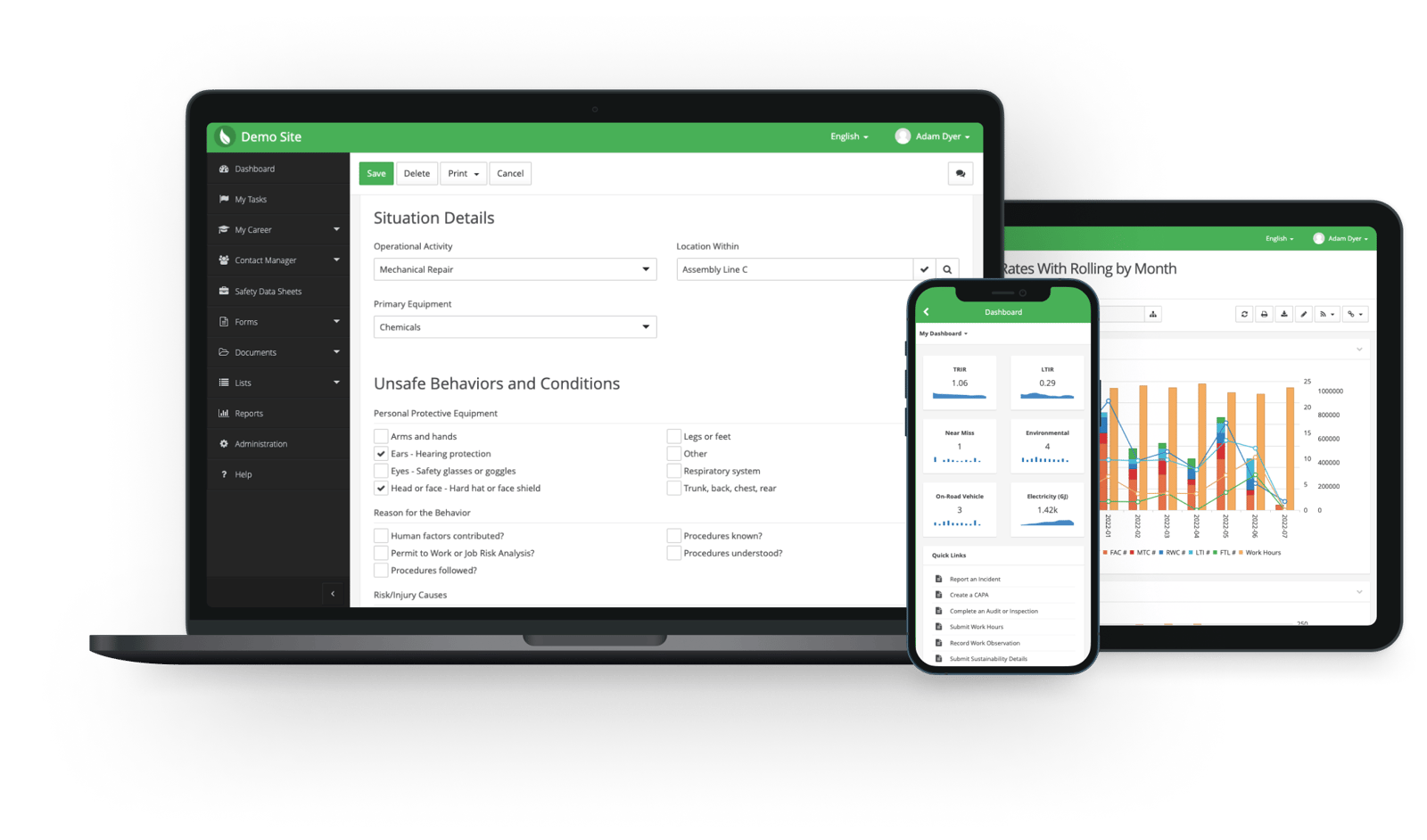
AI Data Analysis Agents That Work Your Way
Configure AI agents to automatically analyze submitted forms, generate ratings and surface insights based on your organization's priorities. Extend AI beyond prebuilt analysis with insights tailored to the way your organization works.
AI Data Analysis Agents Can
- Review form data automatically using custom AI prompts
- Generate ratings, risk scores and actionable insights
- Analyze any supported form type, not just built-in use cases
- Tailor analysis to your workflows and objectives
Example Use Cases
- Score incident reports against your organization's risk criteria
- Identify recurring compliance issues across audit findings
- Flag trends in near misses or observations before they escalate
- Generate custom insights from any form using your own AI prompts
See Risk Earlier
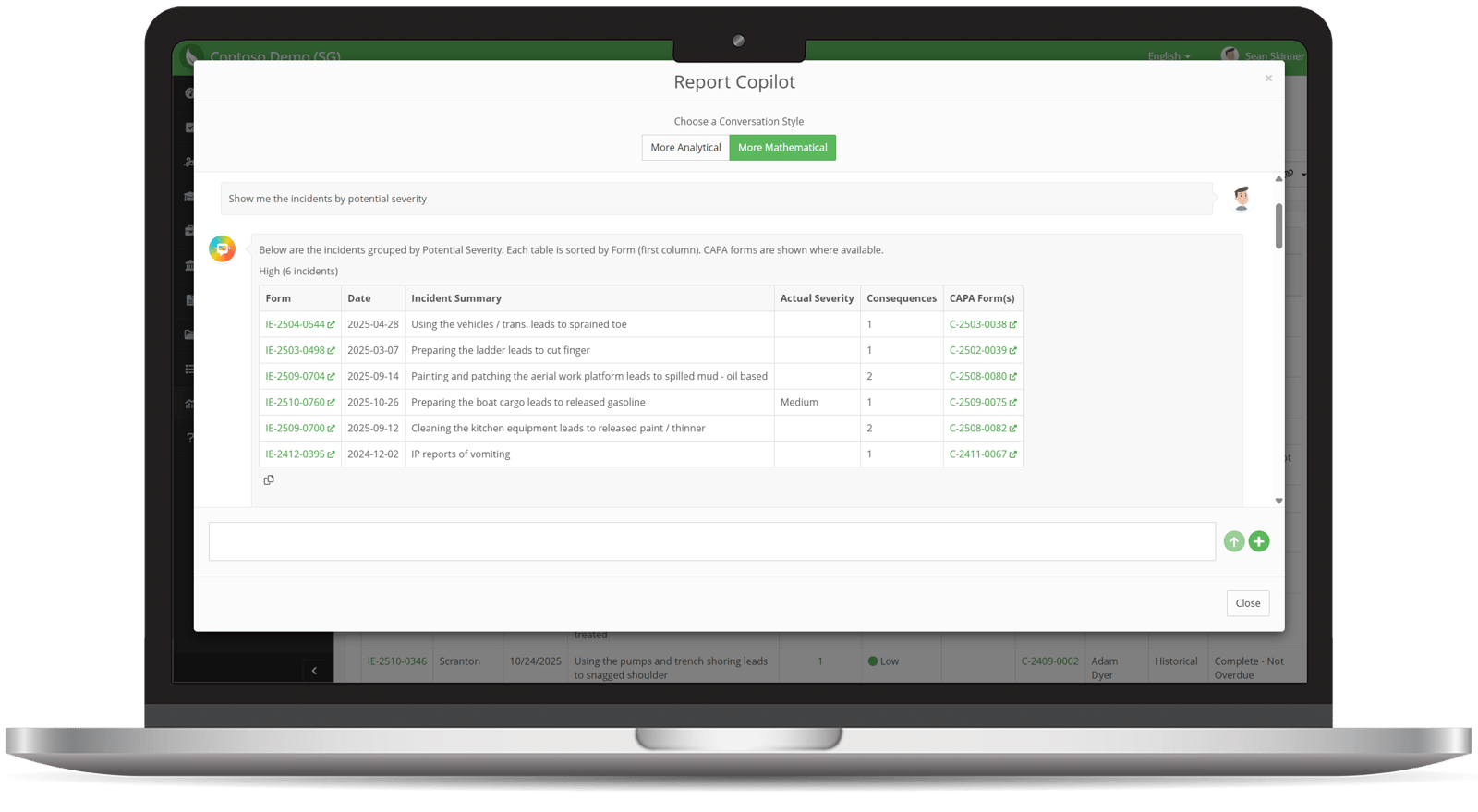
Your Virtual EHS Data Analyst for Forms and Reports
Analyze trends, discover patterns, compare data and ask questions without extra work in Excel or Power BI. The AI Insight Assistant turns every report and form into a conversation, so you get the data clarity you need in plain language.
Ask Your Assistant For
- Summaries and synthetic overviews
- Trend detection and pattern recognition
- Root-cause and contributing factor insights
- Recommendations for next steps or controls
- On-demand insights about the form or report you are viewing
Capture Better Data
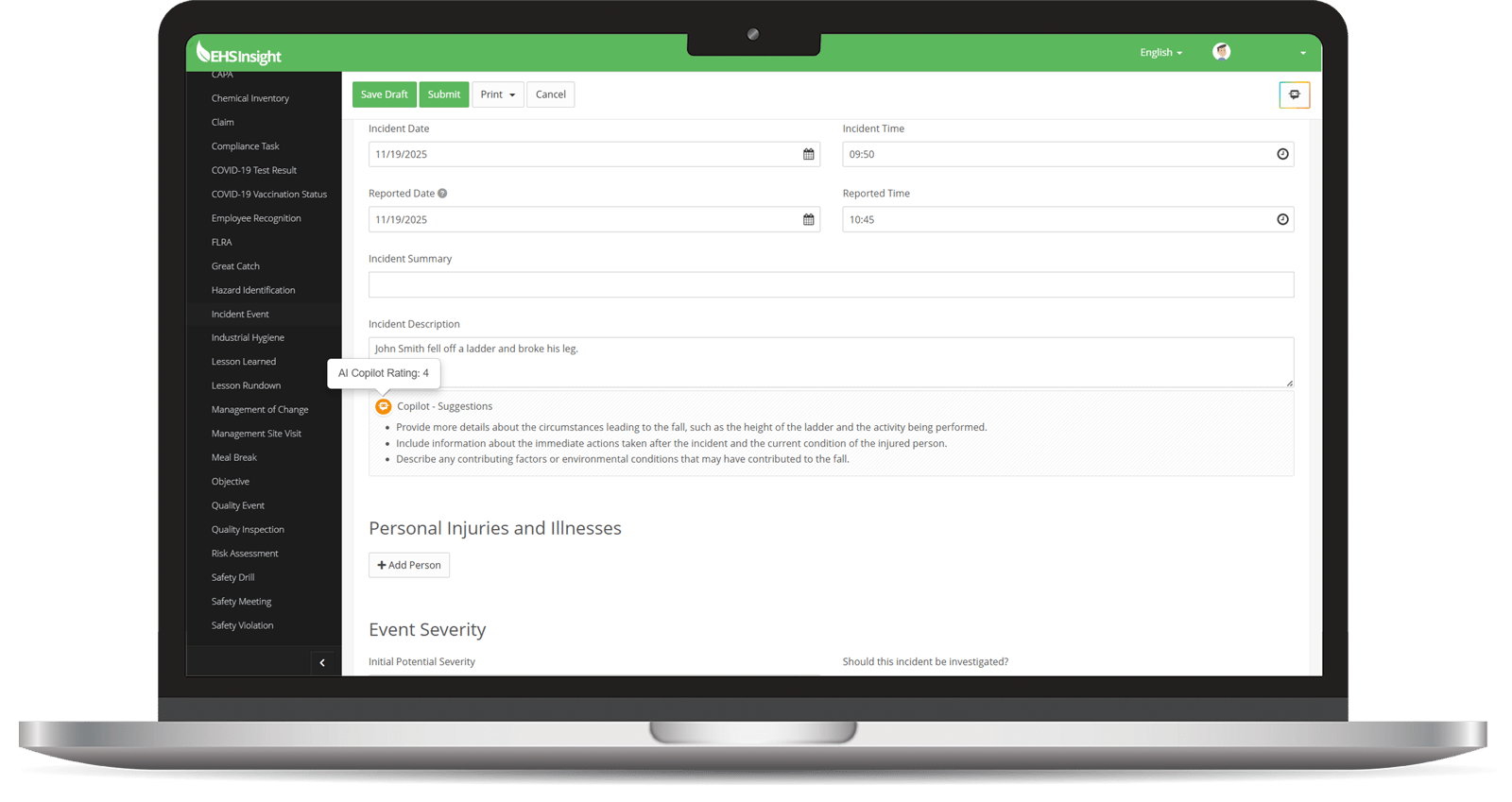
Smarter, More Accurate Safety Reporting
Capturing the right details is essential for analysis, trending and hazard prevention. Field Suggestion AI prompts users with context-aware guidance as they fill out forms, encouraging richer descriptions, reducing vague inputs and strengthening data quality from the first submission.
What It Delivers
- More complete and descriptive records
- Higher data integrity for downstream analytics
- Faster, more accurate incident investigations
- Fewer follow-up questions and clarification loops
Capture Better Data
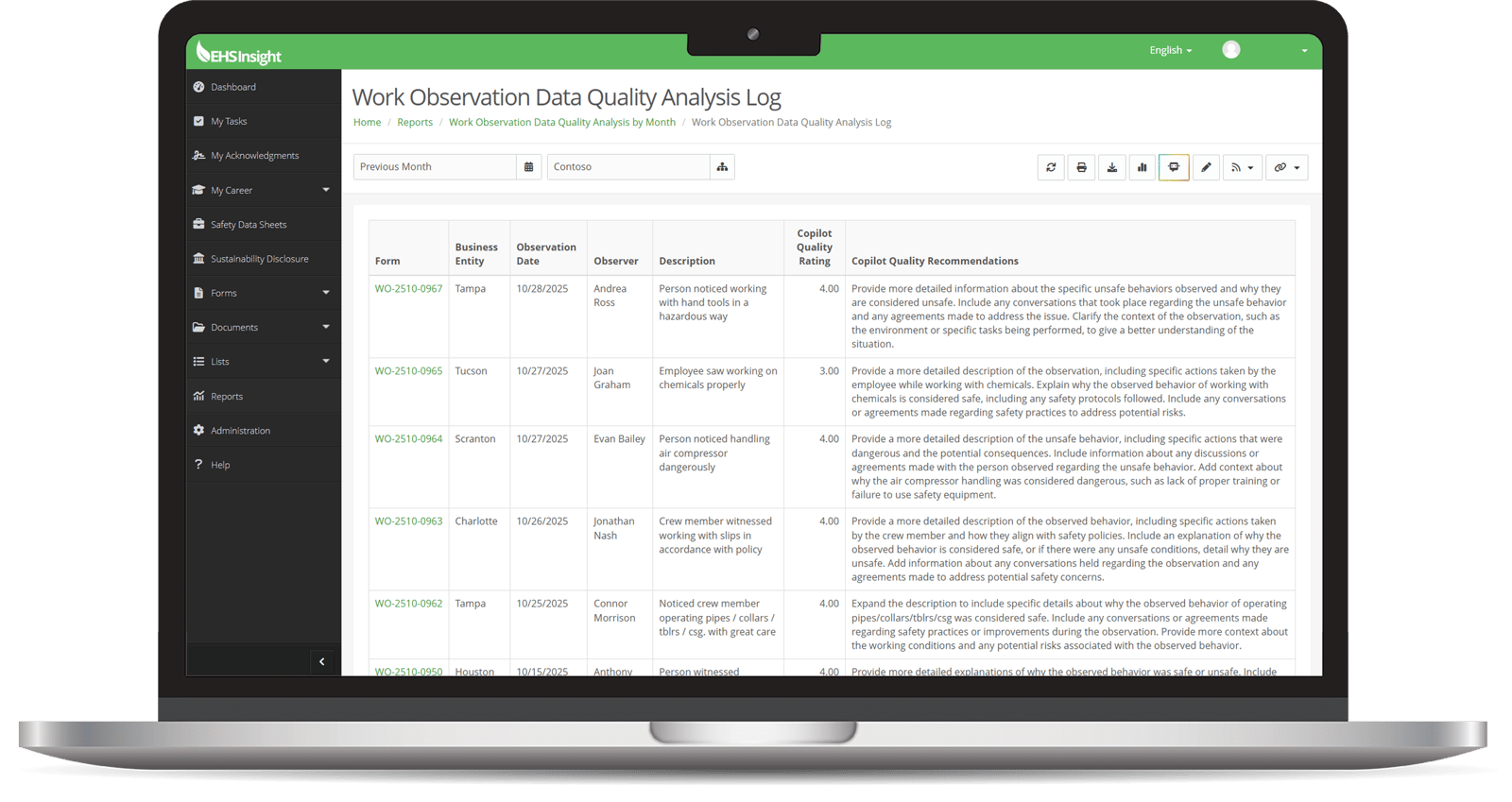
Cleaner Inputs, Smarter Outputs
Strong EHS analytics depend on solid data. Data Quality Analysis AI checks form submissions for missing information, inconsistencies and low-quality entries before they reach your dashboards.
The Result
- Higher reporting accuracy
- More trustworthy dashboards
- Consistent records across teams
- Better decisions built on reliable data
Capture Better Data
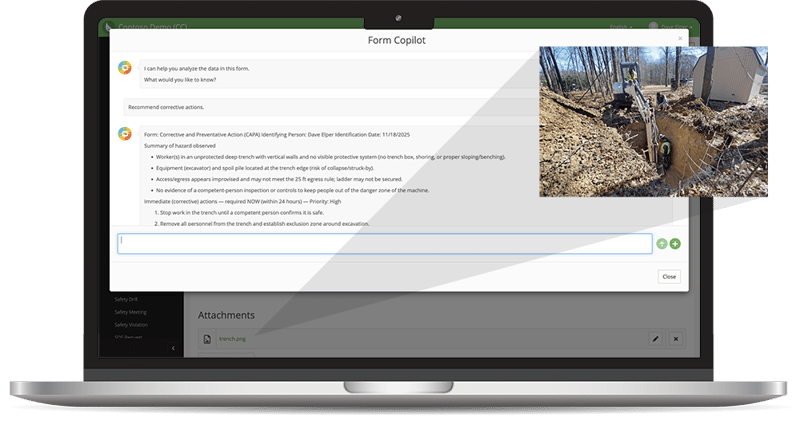
AI That Sees Hazards Through Your Photos
Forms include Vision AI, so the system analyzes attached images and includes that context in its feedback. Photos become real data, raising the accuracy and insight of every form.
Vision AI Understands
- Unsafe conditions in observations
- Hazard indicators in FLRAs
- Compliance deviations in quality inspections
- Missing PPE
- Environmental exposures
- Equipment or workspace hazards
Example Use Cases
- Upload a jobsite photo and ask EHS Insight AI to identify visible hazards
- Add a trenching photo and get recommended corrective actions
- Compare a reference part to a real part to identify nonconformities
Capture Better Data
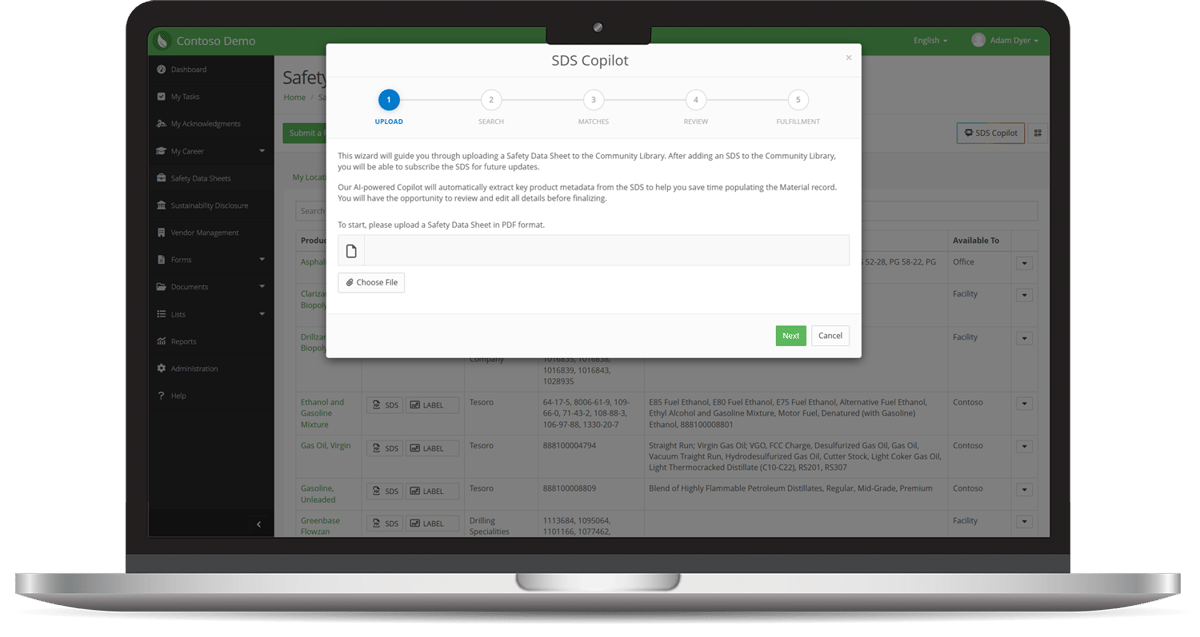
AI-Driven SDS Data Extraction
The AI-powered SDS wizard streamlines Safety Data Sheet management by extracting key information from uploaded documents and keeping your SDS Community Library accurate and up to date.
What It Does
- Automated data extraction: AI pulls product name, manufacturer, revision date and hazard information
- Faster library updates: Add new records or update existing ones without manual data entry
- Improved accuracy: Reduce human error and keep chemical inventory records current
Capture Better Data
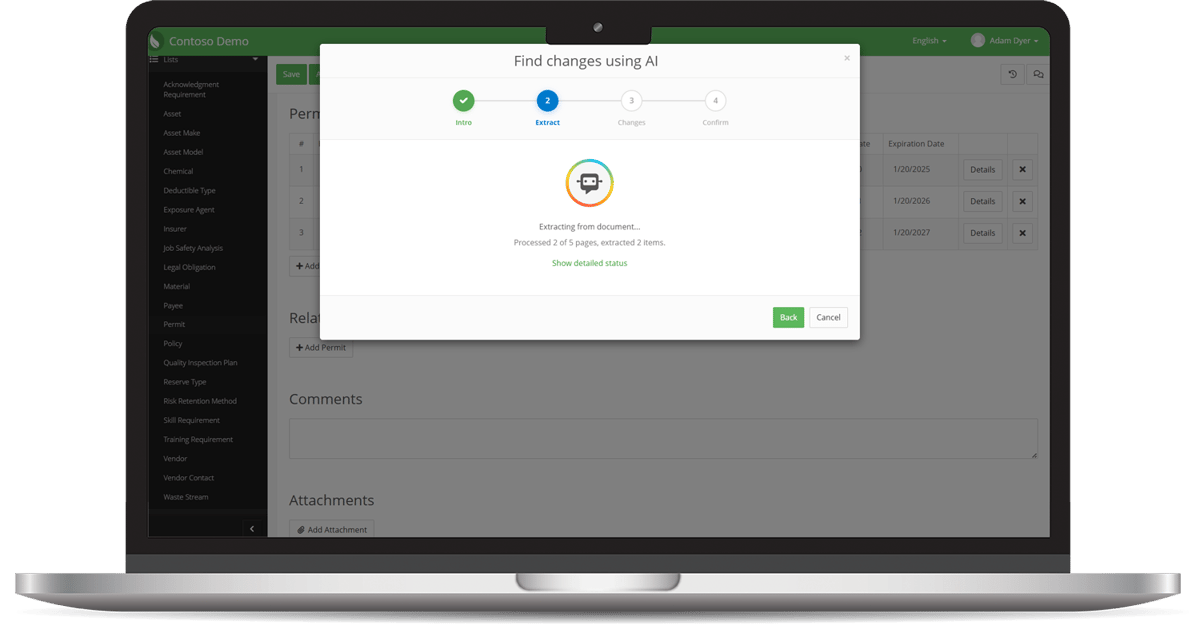
AI Reads. You Review. Nothing Gets Missed.
Permits are dense, legal and constantly subject to amendments and renewals. Permit AI reads a permit document to extract and categorize every compliance requirement, then groups them into suggested topics you can refine by chat. When a permit is reissued, AI compares the new version against the last so you can see what changed.
Permit AI Delivers
- Detection of requirements, citations, page numbers, categories, responsible parties and frequencies
- Requirements grouped by activity, frequency, unit or whatever fits your permit
- A review step before anything is confirmed, so you stay in control
- AI-detected changes between permit versions, with full revision history and implementation status
Capture Better Data
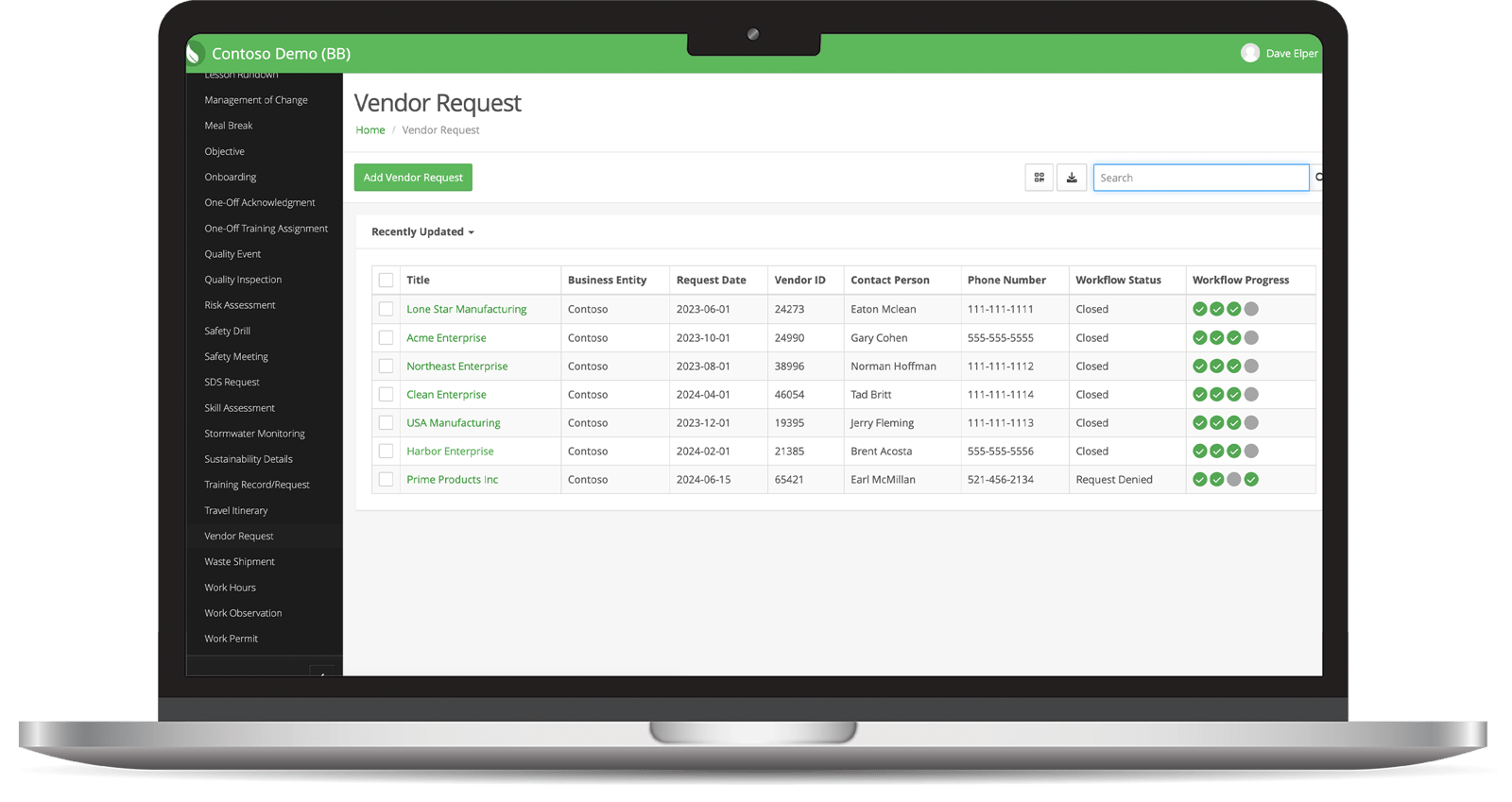
Flag Vendor Issues as Soon as Documents Arrive
Checking every certificate, insurance form and qualification record by hand takes time. AI Vendor Document Review analyzes vendor documents as soon as they are uploaded and evaluates them against configurable review rules before approval. Reviewers keep full control over every approval decision.
What Reviewers Get
- Instant status: Each document is marked Passed, Flagged or Not Analyzed
- Early issue detection: Spots problems like expired documents or company names that do not match the vendor record
- Focused reviews: Shows reviewers exactly which documents need a closer look
Act Faster
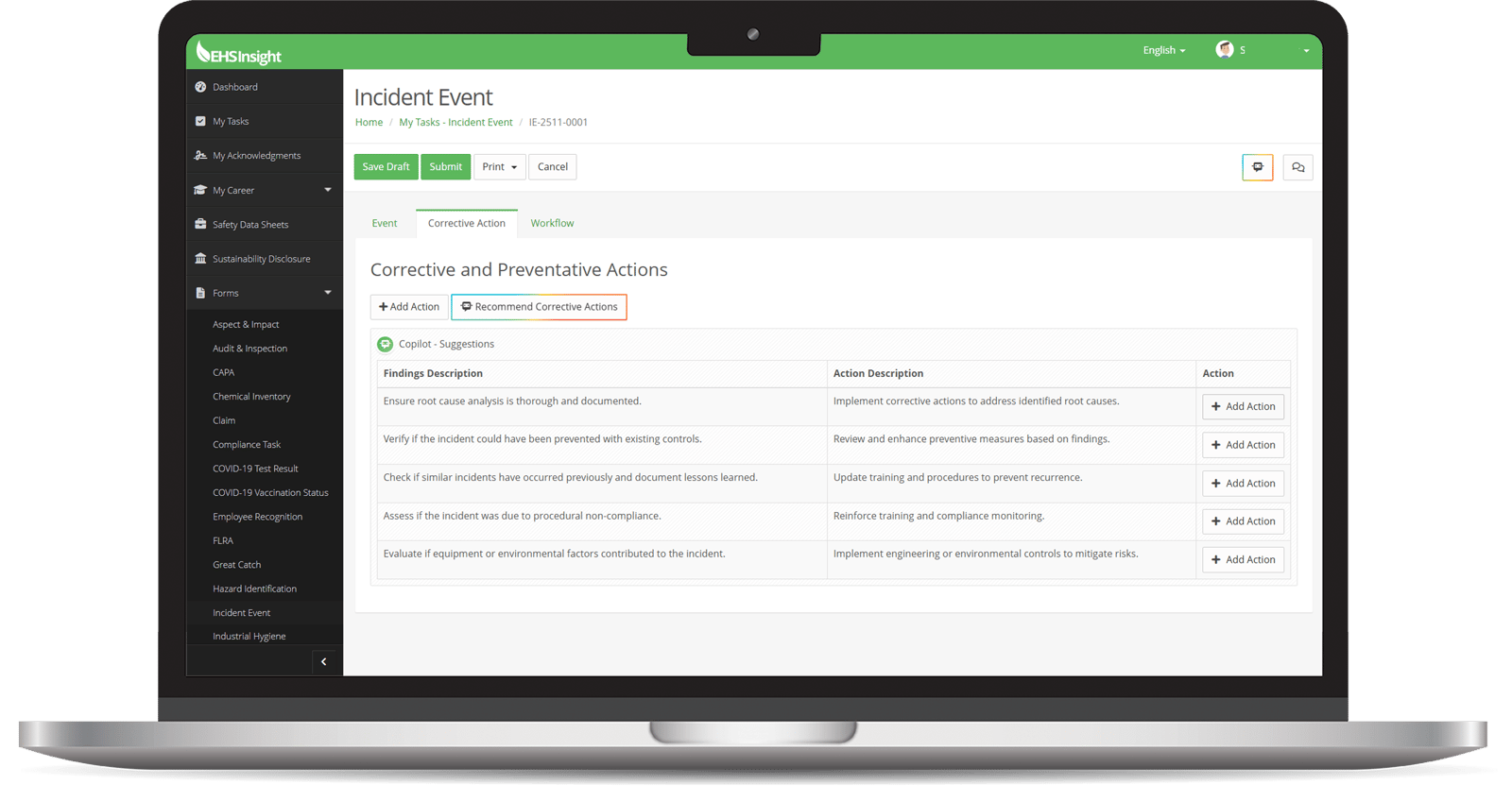
AI-Recommended Corrective Actions, One Click Away
CAPA AI worksheets include an AI assist button that recommends corrective actions based on form data. It eliminates repetitive entry, improves consistency and speeds up corrective action creation across your program.
With a Single Click You Can
- Review the AI-generated recommendations
- Auto-populate findings and action descriptions
- Initiate CAPAs directly
Act Faster
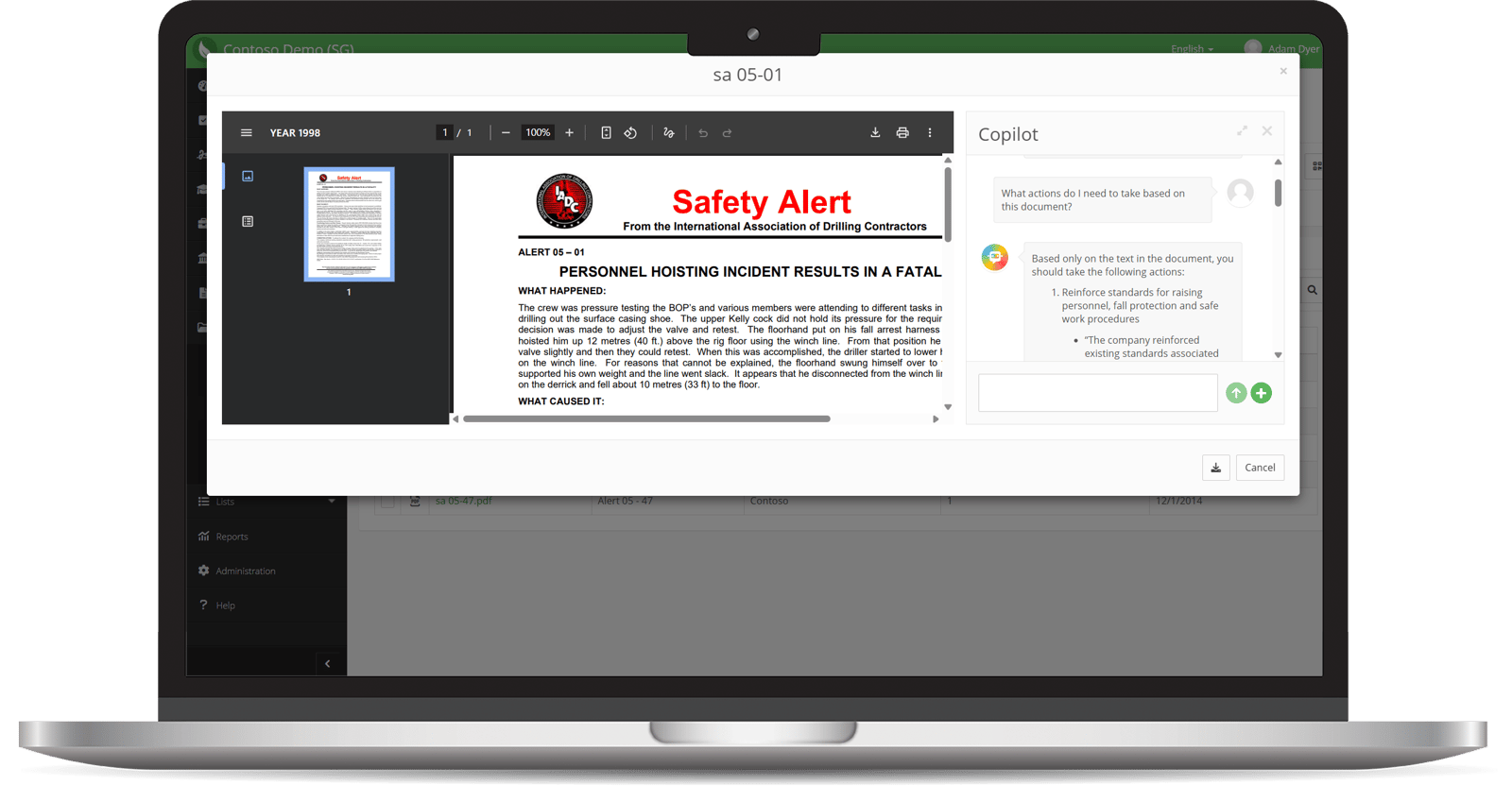
Instant Summaries, Insights and Action Plans From PDFs
Document AI analyzes any PDF in the platform, including SOPs, training materials, audits, attachments and vendor files. It opens in a sidebar, so users can read, work and chat with AI at the same time.
Ask EHS Insight To
- Summarize compliance requirements
- Extract actionable steps
- Draft training guides
- Create communication plans
- Highlight key risks or obligations
MCP Connector
Ask EHS Insight Anything, From Anywhere Your Team Works
Once you connect, your AI assistant can answer questions that would otherwise mean logging in, finding the right report, filtering the data, exporting to Excel and reformatting. You ask. The AI knows where to look.
With the MCP Connector you can:
- Query live incident, audit, training and compliance data
- Draft reports, summaries and executive updates
- Surface trends, overdue actions and emerging risks
- Analyze data across multiple EHS modules in a single conversation
- Work from your preferred AI assistant, with no proprietary chatbot required
Show me all overdue corrective actions from our Q2 audits.
EHS Insight connector
- Calls the EHS Insight connector
- Queries the Audits module and filters to Q2
- Pulls open corrective actions and checks each against its due date
An answer drawn from your live data, in the same conversation where you will draft the follow-up message.
Find any EHS incident where the injured person was the observed person on a work observation within the two weeks prior to their injury.
EHS Insight connector
- Plans a multi-step query across modules
- Pulls incidents and work observations
- Adapts when it hits a wall and matches people across the two-week window
A multi-step analysis no dashboard is built to run, returned as one correlated answer.
Which business entities have seen worsening incident rates? Which have seen worsening Work Observation participation? Is there a correlation?
EHS Insight connector
- Trends incident rates by business entity
- Trends Work Observation participation by business entity
- Tests the two for a correlation
A leadership-ready summary with the correlation, ready for the executive deck the AI helps you draft next.
Example questions. Answers come from your own live, permissioned EHS Insight data.
Setup in Minutes
Connect Once. Ask in Plain Language. The AI Does the Rest.
No IT project and no integration SOW. Users connect through standard OAuth, the same kind of flow your team already uses to grant access to other enterprise tools.
Connect
Open Claude, ChatGPT or Microsoft Copilot and go to settings. Add a new connector and paste the MCP URL from the AI Connector (MCP) page in EHS Insight Administration.
Authenticate
You are redirected to EHS Insight to log in. Approve the connection on a simple permission screen.
Ask
Your AI sessions now have live access to the EHS Insight data you are allowed to see. Start the conversation.
For admins: Enable the AI Connector (MCP) setting and assign the AI Connector User role to the people who should connect. You control who can enable MCP and can audit the OAuth grants in EHS Insight.
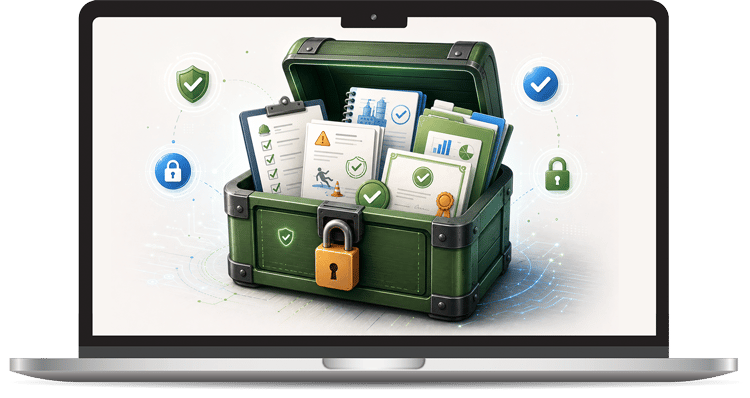
Security and Governance
A Security Upgrade, Not a Security Risk
EHS data is already moving into AI tools in most organizations. People export incident reports to Excel and paste them into ChatGPT. They copy CAPA tables into Claude. They do it to get work done, and it happens ungoverned and unlogged, outside the security review that enterprise AI agreements were meant to cover.
MCP replaces that manual workflow with something measurably better.
| What Matters | Today: Export and Paste | With the EHS Insight MCP Connector |
|---|---|---|
| Data | A static export that is out of date the moment it is copied | Live data, never replicated. Every query runs against your actual EHS Insight records. |
| Permissions | Whoever has the file sees everything in it | The AI sees only what the authenticated user is permissioned to see. Every session is read-only and follows role-based and row-level permissions. |
| Audit Trail | None | Every query is audit-logged through the same trail as your UI and API. |
| Credentials | Files passed around in email and chat | Standard OAuth. No shared service accounts, no embedded keys and no credentials in chat history. |
| AI Vendor | Whatever tool the employee chose, outside your review | Your existing Claude, ChatGPT or Microsoft Copilot agreement governs the AI side. No new AI subprocessor. |
MCP moves EHS Insight data into a system the customer already controls and has already made governance decisions about. That is a different risk profile than a lot of other arrangements.
Eric Stevens, Chief Technology Officer, EHS Insight
Which Layer Does What
Built-In AI, MCP Connector and API, Side by Side
The three AI layers are complementary, not competing, and none of them replace the EHS Insight interface. Dashboards, forms and workflows continue exactly as they are.
| Task Assistant AI | Analytical AI | MCP Connector | EHS Insight API | |
|---|---|---|---|---|
| Where It Works | Inside EHS Insight forms and workflows | Inside EHS Insight reports, forms and documents | Inside Claude, ChatGPT and Microsoft Copilot | Inside applications your developers build |
| Built For | Everyone who submits or reviews EHS records | EHS managers and analysts working in the platform | Information workers who already run their day in an AI assistant | Developers |
| What It Does | Gets high-quality data into the system: reviews incident descriptions for missing concepts, suggests corrective actions from investigation photos and breaks permits into compliance tasks | Searches, trends, summarizes and reports on your data without manual query building | Answers plain-language questions from live, permissioned data across modules and drafts summaries and updates | Gives programmatic access to the same underlying data |
| How You Start | Ask your representative which AI features are included with your license | Ask your representative which AI features are included with your license | Admin enables the AI Connector (MCP) setting; users connect with OAuth | A developer builds the integration |
Buyer's Guide
Eight Questions to Ask About AI in EHS Software
AI is now part of every EHS software conversation. Use these questions to separate AI that changes outcomes from AI that only demos well, and see how EHS Insight answers each one.
Is the AI built into the workflows, or is it a separate chatbot?
EHS Insight AI shows up inside forms, reports, permits, SDS, vendor documents and CAPAs, where the work already happens.
Does it improve the data going in, not only the reports coming out?
Field Suggestion AI and Data Quality Analysis AI coach users and check submissions, so analytics start from complete, consistent records.
Is it tuned for EHS, and can you configure it?
The AI is pre-tuned with EHS concepts and terminology. You can fine-tune suggestions and configure Data Analysis Agents with your own prompts.
Does the math hold up?
EHS Insight BI tools provide accurate mathematical operations, which many pure LLM-based AI tools lack.
Do people stay in control of decisions?
Permit AI includes a review step before anything is confirmed, and AI Vendor Document Review leaves every approval decision with your reviewers.
Does AI access respect each user's permissions?
AI tools only access data authorized for each user. MCP sessions are read-only and follow role-based and row-level permissions.
Is every AI query logged?
MCP queries are audit-logged through the same trail as the EHS Insight UI and API.
Can your team use the AI tools it already pays for?
The MCP Connector works with Claude, ChatGPT and Microsoft Copilot under your existing agreement, with no new AI subprocessor and no per-query charge from EHS Insight.



Go Deeper
More on EHS AI and the MCP Connector
What Is MCP, and Why We Built It Into EHS Insight
How MCP fits with the platform's existing AI layers and what it changes for safety teams.
Why the MCP Connector Is a Security Upgrade, Not a Security Risk
Authentication, permissions, audit logging and subprocessors, explained.
How EHS Insight Works Inside Claude, ChatGPT and Copilot
Answer weekly requests for incident data and overdue actions in seconds.
What the MCP Connector Changes for EHS Leadership
Turn the questions your board asks into a conversation with your data.
FAQ
EHS AI and MCP Connector Questions
Want to see the AI on your own workflows? Take the Instant Demo or request a custom quote.
EHS Insight AI
What is AI for EHS?
AI for EHS applies machine learning and large language models to environmental, health and safety data and workflows. It helps teams capture better data, spot risk patterns such as serious injury and fatality (SIF) precursors, recommend corrective actions, summarize documents and answer questions about their program in plain language.
In EHS Insight, AI is built into the platform through Task Assistant AI and Analytical AI, and the MCP Connector brings your live EHS data to Claude, ChatGPT and Microsoft Copilot.
What is the main focus of integrating AI into the EHS Insight platform?
The primary focus is enhancing functionality through AI while protecting data security and privacy. AI is integrated across the platform to improve user experience, data accuracy and real-time analysis without compromising the integrity of sensitive information.
How does AI improve data input accuracy in EHS Insight?
Field Suggestion AI offers real-time, context-aware coaching as users fill out forms. It supports users throughout their workflows so data collection is complete and precise, and Data Quality Analysis AI checks submissions for missing, inconsistent or low-quality entries.
What are the AI-powered business intelligence (BI) tools, and how do they benefit users?
The AI-powered BI tools let users explore data through conversation, making it easier to spot trends, perform predictive analysis and handle complex data manipulation. Users make informed decisions without needing advanced technical expertise.
What sets EHS Insight's AI apart from other solutions?
EHS Insight's AI is tailored to the EHS industry. Unlike generic AI models, it is pre-tuned with EHS concepts and terminology, so its suggestions are relevant and useful. You can configure AI Data Analysis Agents and custom prompts to suit your needs, and the platform's BI tools provide accurate mathematical operations, which many pure LLM-based AI solutions lack.
The MCP Connector adds a third layer: your live, permissioned EHS data in the AI assistant your team already uses, with no proprietary chatbot required.
Can the AI tools in EHS Insight be customized for specific industry needs?
Yes. Customers can fine-tune AI suggestions to suit their industry, so the AI provides relevant, effective support for the unique requirements of each organization.
How does EHS Insight ensure data security with AI integration?
EHS Insight applies strict privacy controls so AI tools only access data authorized for each user. Your administrators also control whether external AI tools can connect to your data, so you keep full control over sensitive information.
How does AI in EHS Insight benefit businesses of different sizes?
EHS Insight's AI features are designed to deliver insights and streamline processes for companies of any size. Whether your team needs to take work off a few people or make sense of data from many sites, the AI tools scale with you.
How does EHS Insight's AI improve over time?
EHS Insight's AI improves in two ways:
- Model advancements: The underlying AI models continue to evolve, enabling better predictions and insights.
- Platform enhancements: EHS Insight fine-tunes the AI for EHS applications and keeps improving its output. Customers can also fine-tune the AI to meet their industry needs.
MCP Connector
What is MCP?
MCP stands for Model Context Protocol. It is an open standard that lets AI assistants like Claude, ChatGPT and Microsoft Copilot connect directly to external software systems and query data in real time, scoped to each user's permissions.
Do I need IT to set this up?
No IT project is required. An EHS Insight admin enables the AI Connector (MCP) setting and assigns the AI Connector User role. Users then connect their own AI sessions in about a minute using their existing EHS Insight credentials. For IT-governed environments, admins control which users can enable MCP and can audit the OAuth grants in EHS Insight.
What can I ask my AI to do?
Anything that involves your EHS Insight data. Pull reports, summarize trends, correlate records across modules, draft executive prep and populate slide templates with live program data. If you can describe the question, the AI can find the answer.
Is my data safe?
Every MCP session is authenticated, permissioned and read-only. The AI sees only what the user is permissioned to see in EHS Insight, and queries are audit-logged through the same trail as your UI and API. Your existing AI vendor agreement (Claude, ChatGPT or Microsoft Copilot) governs how those tools handle data passed through the session. EHS Insight does not introduce a new AI subprocessor.
How is this different from your built-in AI?
EHS Insight has two kinds of built-in AI. Task Assistant AI helps you work better inside the platform, with incident review, CAPA suggestions and permit deconstruction. Analytical AI helps you search, trend and report inside the platform. MCP brings analytical capability out to the AI tools where your team is already working. The three layers are complementary, not competing.
Which AI tools does MCP support?
Claude, ChatGPT and Microsoft Copilot, the major AI assistants that have adopted the Model Context Protocol. Google Gemini is not supported.
Does this replace the EHS Insight user interface?
No. Dashboards, forms and workflows continue exactly as they are. MCP is an additional channel for accessing the same underlying data.
How does MCP differ from your API?
The API requires a developer to build something. MCP gives non-technical users a developer in their pocket: their AI writes the API calls in real time based on a natural-language question. Same underlying access, a very different audience.
What does it cost?
Ask your EHS Insight representative which AI features are included with your license, since the in-platform AI module is enabled per site.
Pricing for the MCP Connector is being finalized. AI compute runs on your existing Claude, ChatGPT or Microsoft Copilot subscription, and EHS Insight does not charge per query. Request a custom quote for current pricing.
Put AI to Work Across Your EHS Program
See how EHS Insight catches risk earlier inside the platform and brings your live EHS data into Claude, ChatGPT and Microsoft Copilot.
Want a tour first? Take the Instant Demo